








Close
All Categories
    Filters
    Preferences
    Search
    RSS

    Blog

    0 WorldSkills Jamaica Robotics Training for AMR and UAS

    Quick Summary: International competitors gathered in Jamaica for a five-day robotics training camp designed to prepare them for WorldSkills Shanghai 2026. In partnership with Studica Robotics, the program focused on Autonomous Mobile Robotics (AMR) and Unmanned Aerial Systems (UAS), combining hands-on robot and drone training with real-world competition preparation. Participants progressed from system setup and assembly to programming, testing, and evaluation. The goal was to build both technical and teamwork skills needed for global competition success.

    Robotics Training for WorldSkills Competition

    As global demand for automation and intelligent systems continues to grow, WorldSkills Shanghai 2026 is placing a strong emphasis on advanced robotics training in Autonomous Mobile Robotics (AMR) and Unmanned Aerial Systems (UAS), where competitors must apply engineering principles in real time under international competition standards.

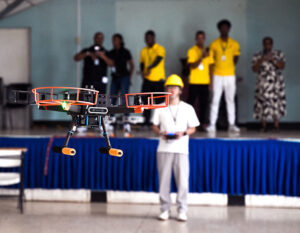
    WorldSkills Jamaica Hosts Five-Day Invitational Training CamThis type of robotics training goes beyond technical instruction; it mirrors the environments shaping modern industry, from smart manufacturing and autonomous logistics to precision agriculture, infrastructure inspection, and emergency response systems. Participants gain hands-on experience with technologies that are actively transforming how work is designed and delivered worldwide.

    By working through real-world challenges in both AMR and UAS, competitors strengthen not only their technical capabilities but also their problem-solving, adaptability, and collaboration skills essential for success at WorldSkills Shanghai 2026 and beyond.

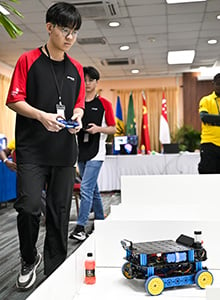
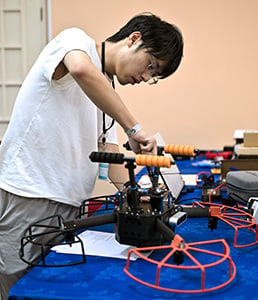
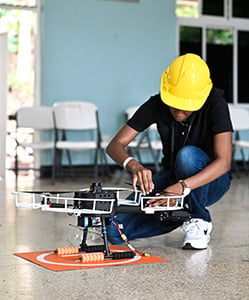
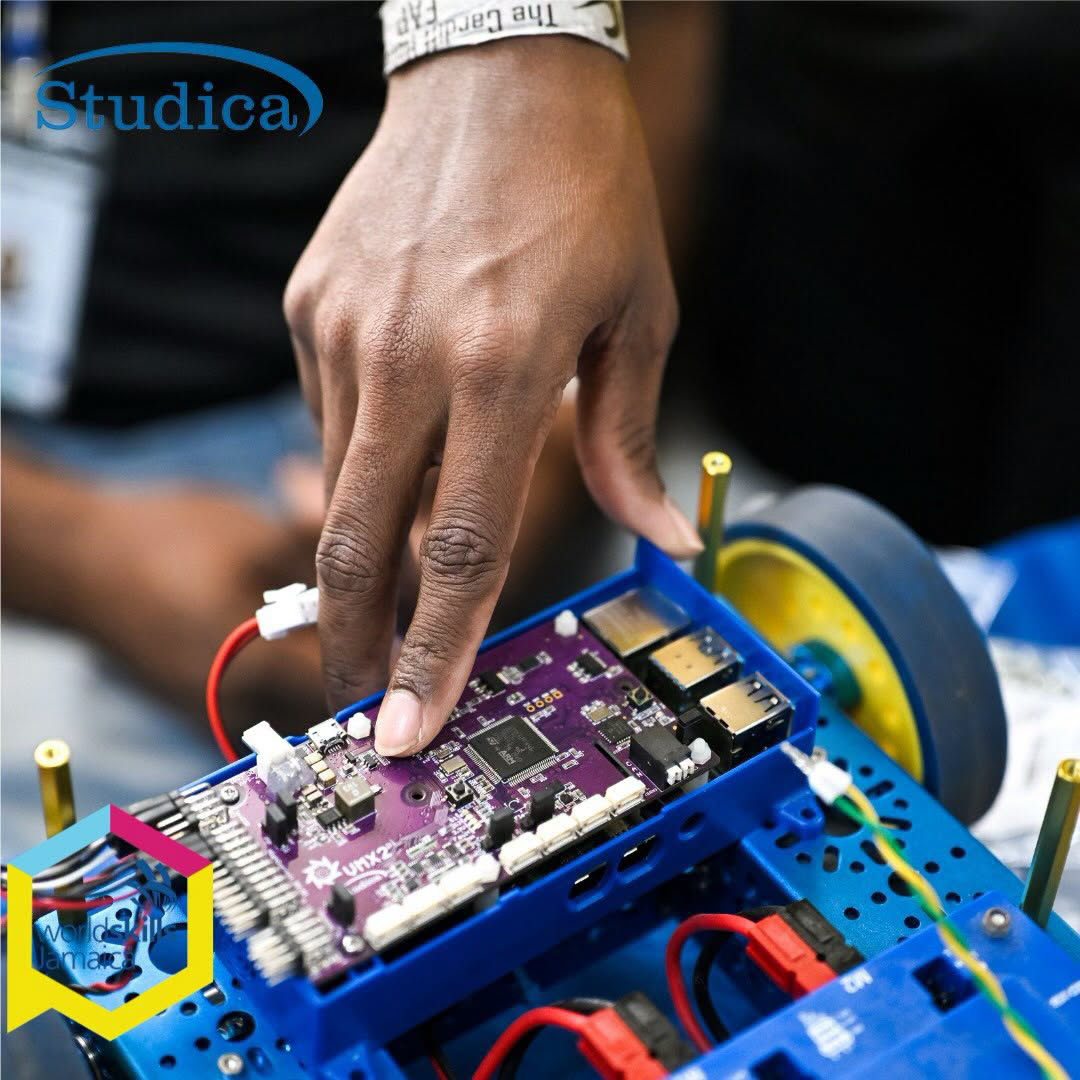
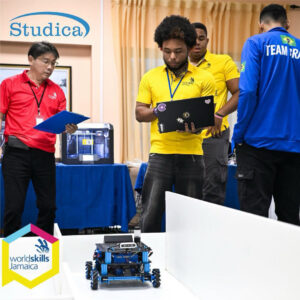
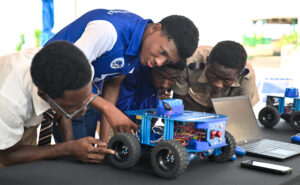
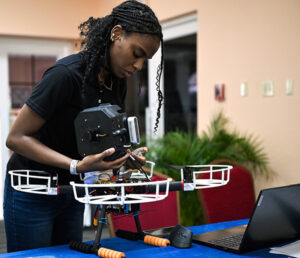
    WorldSkills Jamaica Robotics Training WorldSkills Jamaica Robotics Training for AMR WorldSkills Jamaica Robotics Training for UAS Robotics Training for WorldSkills Competition

    Inside the Robotics Training Experience

    The five-day training camp followed a progressive learning model that moved competitors from foundational system setup to competition-level performance in both Autonomous Mobile Robotics (AMR) and Unmanned Aerial Systems (UAS). Each phase built upon the previous one, combining technical instruction, hands-on application, and performance evaluation.

    Training Phase Activities & Outcomes
    Phase 1: Foundation and Team Building Competitors were introduced to the competition environment, assembled workstations, reviewed system components, and built connections with participants and experts from around the world.
    Phase 2: Technical Immersion Participants explored ROS2, tele-operation, SLAM, grid-based mapping, autonomous navigation, and drone control systems while integrating hardware and software components.
    Phase 3: Competition Simulation Teams applied their knowledge through autonomous navigation challenges, flight exercises, troubleshooting activities, and real-time decision-making under competition conditions.
    Phase 4: Performance Optimization Competitors refined system performance, debugged technical issues, optimized navigation and control strategies, and received coaching from international experts.
    Phase 5: Evaluation and Showcase The program concluded with system demonstrations, drone mission execution, performance assessments, and evaluations of teamwork, communication, and technical readiness.

    By the end of the program, participants had progressed from assembling and configuring systems to executing autonomous navigation tasks, flying drones under performance constraints, and demonstrating the teamwork and technical proficiency required for WorldSkills competition.

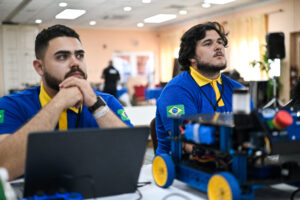
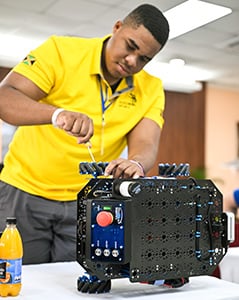
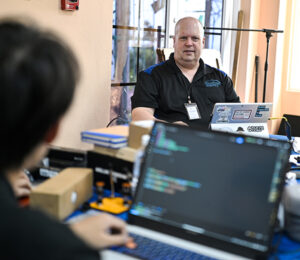
    WorldSkills Jamaica Robotics Photo A WorldSkills Jamaica Robotics Photo B WorldSkills Jamaica Robotics Photo E WorldSkills Jamaica Robotics Photo D

    Voices from the Camp

    Voices from the Robotics Training Camp"Through international collaboration, knowledge sharing, and hands-on learning, participants are gaining valuable exposure to industry-leading practices in autonomous mobile robotics." -Walace Felipe de Almeida Oliveira, WorldSkills Brazil

    “Robotics is not an activity that only men can partake in. Women can, as well, and we’re living proof of this…”
    - St. Hilda’s Diocesan High School Team Captain, Toria-Lee Martin

    “If you want to beat the best, you have to see how the best train.”
    - Derek Murphy, General Manager, Studica Robotics

    Why Train AMR?

    AMR Autonomous Mobile Robotics TrainingAutonomous Mobile Robotics (AMR) is one of the fastest-growing areas in technical education and modern industry. It focuses on designing and building robots that can move and operate independently using sensors, control systems, and intelligent programming. Through AMR training, participants develop a wide range of integrated engineering skills, including mechanical and electronic system design, sensor integration, and automation. They also strengthen their ability to program autonomous systems, enabling robots to navigate, map environments, and respond to real-world conditions. AMR training also develops problem-solving and teamwork skills, reflecting the collaborative nature of real-world engineering environments.

    Why is UAS Important?

    Autonomous Mobile Robotics TrainingUnmanned Aerial Systems (UAS) are rapidly expanding across industries and are becoming essential in areas such as infrastructure inspection, agriculture, logistics, disaster response, and environmental monitoring.

    Training in UAS helps participants understand both the mechanical and digital systems behind drone technology. This includes building and configuring aerial systems, programming flight behavior, and developing the ability to troubleshoot and diagnose technical issues. As with AMR, this training strengthens critical thinking, engineering methodologies, and technical collaboration. These skills are increasingly in demand across aerospace, advanced manufacturing, infrastructure inspection, and emerging drone technology sectors.

    Studica Robotics and Global Skills Development

    With over 40 years of experience supporting technical education, Studica Robotics provides standardized training kits, curriculum resources, and technical support for WorldSkills member countries. For AMR competitions, teams use the official WorldSkills Autonomous Mobile Robotics Collection. For UAS training, participants utilize the WS500 Quadcopter Kit to build, program, and operate drone systems while also developing troubleshooting and diagnostic skills.

    This structured ecosystem helps ensure consistent training quality while encouraging collaboration and peer learning across countries. Through its partnership with WorldSkills, Studica Robotics helps member countries develop robotics and UAS skills by providing standardized equipment, training resources, and competition support.

    What This Robotics Training Experience Delivers

    Autonomous Mobile Robotics Training FlyingBeyond technical preparation, the training camp is designed to build long-term capabilities that extend well beyond the competition itself. It strengthens real-world engineering and robotics skills by providing competitors with hands-on experience with systems they will encounter in advanced technical environments. At the same time, it improves collaboration within international teams, where participants must communicate, adapt, and work effectively across different cultures and approaches.

    The experience also helps develop the ability to solve complex problems under the pressures of a competition environment, where timing, accuracy, and decision-making all matter. Most importantly, it supports clear pathways into future technical careers by exposing participants to industry-relevant tools, processes, and expectations.

    This training camp provided competitors with an opportunity to develop their skills in a collaborative international environment while preparing for the upcoming challenges of WorldSkills Shanghai 2026.

    Frequently Asked Questions

    What is Autonomous Mobile Robotics (AMR)?
    AMR involves designing, building, and programming robots that operate independently using sensors, control systems, and automation logic.

    What are Unmanned Aerial Systems (UAS)?
    Unmanned Aerial Systems (UAS) focus on drone technology, including assembly, programming, flight control, maintenance, and system diagnostics.

    Who is this WorldSkills Jamaica robotics training for?
    It is designed for students and competitors preparing for international robotics competitions and technical skills development programs.

    How does Studica Robotics support WorldSkills?
    Studica Robotics provides standardized kits, training materials, and technical expertise to support global robotics education and competition readiness.

    What is the goal of the WorldSkills Jamaica robotics training camp?
    To prepare competitors for WorldSkills Shanghai 2026 through hands-on robotics and drone training under real competition conditions.

    Conclusion

    The WorldSkills Jamaica & Studica Robotics Invitational Training Camp demonstrated how immersive, hands-on learning can accelerate technical skill development and global competition readiness.

    Over five days, competitors moved from foundational system understanding to full competition performance in Autonomous Mobile Robotics and Unmanned Aerial Systems. Beyond robotics, the camp strengthened collaboration, communication, and confidence. These skills are essential for success in both international competition and future technical careers.

    As robotics, automation, and drone technologies continue reshaping global industries, programs like this are not just training events; they are launchpads for the next generation of skilled robotics professionals.

    0 Understanding the Field-Centric Drive in FTC

    Quick Summary: Field-centric drive is a control system commonly used in FTC mecanum drivetrains that keeps robot movement aligned to the field instead of the robot’s orientation. Unlike robot-centric drive, drivers do not need to mentally adjust controls when the robot rotates. This article explains what field-centric drive is, how it works, the math behind it, and common considerations teams should understand before implementing it.

    What Is Field-Centric Drive?

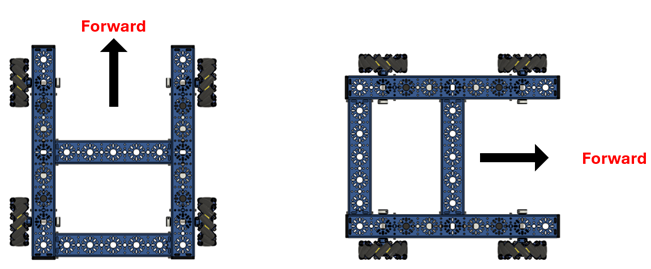
    In traditional robot-centric teleop control, robot movement is based on the robot’s orientation. The robot has a designated “front” and “back,” and the controls rotate with the robot.

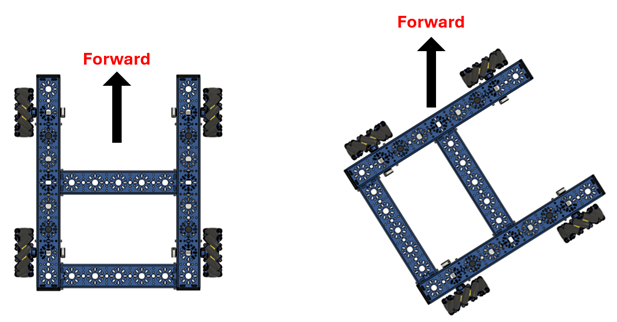
    For example, if the robot turns 90 degrees to the right, pushing the joystick forward causes the robot to move toward the right side of the field because the front of the robot is now facing that direction.

    Field-centric drive changes this behavior by making movement relative to the field rather than the robot’s orientation. No matter which direction the robot faces, controls stay aligned to the driver’s perspective from the driver station.

    Robot Orientation Diagram for Robot Centric Drive
    Robot Orientation Diagram for Robot-Centric 

    Robot-Centric vs. Field-Centric Drive

    Let's take a closer look at the robot-centric drive and the field-centric drive so you can understand how and when each could work best for your team.

    Robot-Centric Drive

    With robot-centric drive:

    • Pushing the joystick forward moves the robot in the direction the robot is facing
    • Controls rotate with the robot
    • Drivers must constantly account for robot orientation during movement

    Robot-Centric Drive Perspective

    Robot-Centric Drive Perspective

    Field-Centric Drive

    With a field-centric drive:

    • Pushing the joystick forward always moves the robot forward relative to the field
    • Controls remain consistent regardless of robot orientation
    • Drivers can rotate the robot without mentally remapping controls

    Field-Centric Drive Perspective

    Field-Centric Drive Perspective

    Why FTC Teams Use Field-Centric Drive

    Field-centric drive is commonly used in FTC because it can create a more intuitive driving experience, especially with mecanum drivetrains.

    Benefit Description
    Intuitive controls Forward on the joystick always moves the robot forward relative to the field, regardless of robot rotation.
    Easier navigation Helps drivers maintain straighter paths and execute smoother strafing and diagonal movement.
    Better focus on gameplay Reduces mental load so drivers can focus on scoring and strategy instead of orientation.
    Improved omnidirectional movement Works especially well with mecanum drivetrains for full-direction movement without needing to rotate first.
    Faster reaction time Drivers respond more quickly because controls stay consistent under rotation.

    However, preferred drive style still depends on driver comfort and experience.

    How Field-Centric Drive Works

    Field-centric drive works by using the robot's current heading from the IMU (Inertial Measurement Unit) to transform joystick inputs before they are applied to the drivetrain.

    The driver still uses the same controls as a standard FTC mecanum drivetrain:

    • Left Joystick X → Strafing
    • Left Joystick Y → Forward/Backward movement
    • Right Joystick X → Rotation

    The difference is that the translational inputs (X and Y) are adjusted using the robot's heading, while the rotational input remains unchanged. This allows movement to remain aligned with the field instead of the robot's orientation.

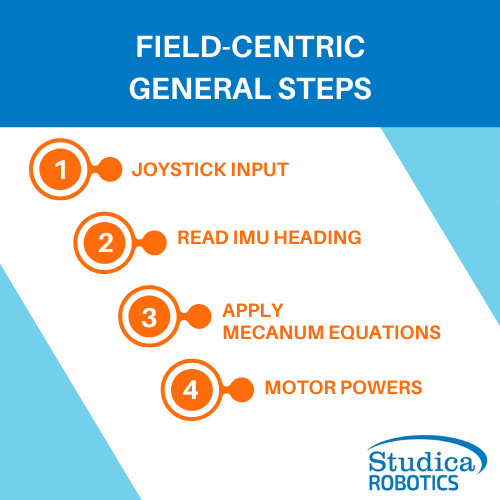
    Field-Centric General StepsThe process follows these general steps:

    Joystick Input

    Read IMU Heading

    Apply Mecanum Equations

    Motor Powers

    For example, if the robot turns 90 degrees, the software compensates for that change in orientation. As a result, pushing the joystick forward still moves the robot forward relative to the field, regardless of which direction the robot is facing.

    Field-Centric Drive: The Math Behind the Controls

    Field-centric drive works by mathematically rotating the driver's joystick input based on the robot's heading from the IMU. This allows the robot to maintain field-relative movement regardless of its orientation.

    The process can be summarized in three steps:

    1. Read joystick input (x, y)
    2. Rotate the input using the robot heading (θ)
    3. Apply the corrected values to the mecanum drive equations

    The coordinate transformation used for field-centric control is:

    x′ = x cosθ + y sinθ

    y′ = y cosθ − x sinθ

    Where:

    • x = strafe input
    • y = forward/backward input
    • θ = robot heading from the IMU
    • x′, y′ = corrected field-relative movement commands

    These equations rotate the joystick input to compensate for robot orientation while preserving the driver's intended direction of travel.

    The corrected values are then used in the mecanum drive equations:

    FrontLeft = y′ + x′ + rx

    BackLeft = y′ − x′ + rx

    FrontRight = y′ − x′ − rx

    BackRight = y′ + x′ − rx

    Where rx represents the driver's rotational input.

    For example, if the robot is rotated 90° and the driver pushes the joystick forward, the software adjusts the input before calculating motor power. The result is that the robot continues moving forward relative to the field, even though it is facing a different direction.

    Key Considerations Before Implementing a Field-Centric Drive

    Field-centric drive can improve driver performance, but it also introduces additional system complexity. Before implementing it, teams should evaluate whether their robot, software, and drivers are ready for the added requirements. Here are the key questions teams should ask themselves.

    Team Readiness Checklist

    Field-Centric Drive Team Readiness ChecklistBefore implementing field-centric drive, confirm the following:

    ☐  Fully working mecanum drivetrain
    ☐  Motor directions tested and verified (robot moves correctly in robot-centric mode)
    ☐  Understanding of robot axes: forward, strafe, rotation
    ☐  IMU properly configured in the control system
    ☐  IMU calibrated with stable heading output
    ☐  Joystick inputs correctly mapped (no X/Y inversion issues)
    ☐  Consistent robot-centric control before adding field-centric logic

    Common Field-Centric Setup Issues

    Common Field-Centric Set Up IssuesField-centric drive may behave incorrectly if any of the following are not configured properly:

    ☑️ IMU mounted in a different orientation than defined in code
    ☑️ Missing or inconsistent IMU calibration
    ☑️ Heading drift during operation
    ☑️ Swapped forward/back or left/right axes
    ☑️ Incorrect motor direction inversion
    ☑️ Unpredictable robot behavior when rotated

    Field-Centric Drive vs Robot-Centric Drive

    Both control styles are valid in FTC. The right choice depends on the team's experience, driver preferences, and software maturity.

    Field-Centric Drive Pros & Cons

      Details
    Pros
    • Intuitive control relative to the field
    • Easier strafing and alignment during gameplay
    • Reduces mental workload for drivers
    Cons
    • Requires a reliable IMU and correct calibration
    • More complex math and implementation
    • Sensitive to sensor drift or incorrect configuration
    • Requires occasional debugging (heading reset, telemetry checks)

    Robot-Centric Drive Pros & Cons

      Details
    Pros
    • Simpler to implement and understand
    • Does not require IMU dependency
    • Easier to debug and troubleshoot
    Cons
    • Controls rotate with the robot
    • Drivers must constantly reorient mentally
    • More difficult to strafe precisely under rotation

    Frequently Asked Questions

    Do I need an IMU for field-centric drive?

    Yes. Field-centric drive relies on an IMU (Inertial Measurement Unit) to determine the robot's current heading. Without heading information, the robot cannot compensate for its orientation relative to the field.

    Does field-centric drive only work with mecanum wheels?

    No. Field-centric control can be used with other omnidirectional drivetrains, but it is most commonly implemented in FTC mecanum drivetrains because they can move in any direction without turning first.

    Is field-centric drive better than robot-centric drive?

    Not necessarily. Many teams prefer field-centric controls because they are more intuitive, but robot-centric drive is simpler to implement and can be easier to troubleshoot. The best choice depends on driver preference, team experience, and robot design.

    Why does my field-centric drive behave incorrectly?

    Common causes include incorrect IMU orientation settings, heading drift, swapped joystick axes, incorrect motor directions, or errors in the coordinate transformation equations.

    Should rookie FTC teams use field-centric drive?

    Rookie teams can certainly use field-centric drive, but it is usually best to first ensure the robot drives reliably in robot-centric mode. Once the drivetrain, motor directions, and controls are working correctly, field-centric control can be added as an upgrade.

    Final Thoughts

    Field-centric drive is a popular control method in FTC because it allows robot movement to remain aligned with the field rather than the robot's orientation. By using an IMU to track heading and applying a simple coordinate transformation, teams can create a more intuitive driving experience that reduces the need for constant mental reorientation during matches.

    While field-centric drive introduces additional software complexity and requires a properly configured IMU, many teams find the benefits worthwhile, especially when using mecanum drivetrains. Whether your team chooses field-centric or robot-centric control ultimately comes down to driver preference, experience, and what works best for your robot and game strategy.

    Related Articles


    0 FTC Starter Bot Build Guide: Prep for the 2026-2027 FTC Season
    Use the FTC Starter Bot Build Guide to build skills in robotics design, CAD, wiring, and more for the 2026-2027 BIOBUZZ season.
    0 FTC Mecanum Drive Programming Tips

    Quick Summary: This article walks FTC teams through everything needed to program a mecanum drivebase using the FTC Drive Base Kit from Studica Robotics. You’ll learn how mecanum wheels work, how to configure motors in the Driver Hub, build a working TeleOp program, create a basic autonomous routine, and improve performance through tuning techniques like dead zones and input scaling. Whether you're new to FTC or refining your drivetrain, this is a practical, team-ready resource for building smoother, more precise robot control.

    Mecanum Drive Programming Fundamentals

    Mecanum drivetrains are one of the most powerful and flexible systems used in FTC robotics. When programmed correctly, they allow your robot to move in any direction - forward, backward, sideways, and rotationally - all independently. This article is designed to help teams using the Studica Robotics FTC Drive Base Kit, though the concepts apply to any FTC mecanum drivetrain. For this tutorial, we’ll use a mecanum drivebase built with the mecanum wheel set from Studica Robotics, along with an FTC Control Hub, Driver Hub, and a standard FTC-legal gamepad. All programming will be done in Blocks through the Control Hub’s web-based interface.

    How Do Mecanum Wheels Work?

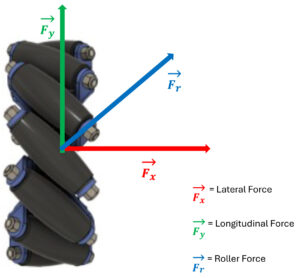
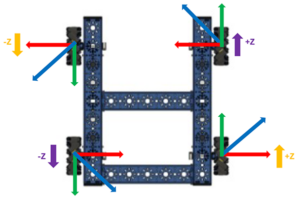
    [caption id="attachment_22015" align="alignright" width="300"]Mecanum Wheel Force Diagram Force Diagram of Mecanum Wheel[/caption] Mecanum wheels use rollers positioned at a 45° angle. Instead of pushing straight forward like traditional wheels, each wheel produces a diagonal force vector. That force can be broken into:

    • Fy → Forward and backward motion
    • Fx → Sideways (strafing) motion

    A single wheel alone isn’t very useful, but when all four wheels work together, those forces combine and cancel in specific ways to create controlled movement.

    Correct Mecanum Wheel Configuration

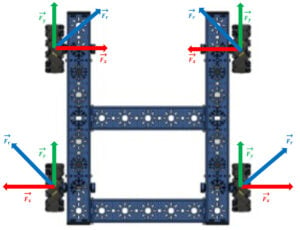
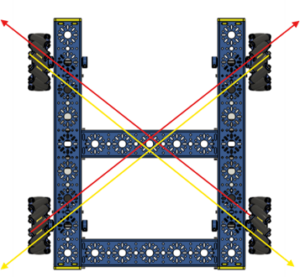
    A mecanum wheel has angled rollers that create force vectors at 45 degrees. When these forces combine across four wheels, the robot can move forward, backward, sideways, or rotate. The “X” wheel configuration:

    • Forces cancel or combine depending on the direction of travel
    • Forward motion cancels sideways forces
    • Strafing cancels forward forces
    • Rotation creates torque around the robot's center

    This is what makes mecanum drivetrains holonomic, allowing full directional movement without turning first.

    Force Diagram of Each Wheel in a Mecanum Drivebase Force Diagram of Each Wheel in a Mecanum Drivebase X Pattern of Wheels in Mecanum Drivebase X Pattern of Wheels in a Mecanum Drivebase

    Hardware Setup (Driver Hub Configuration)

    Before coding, you must configure the robot hardware in the FTC Driver Station. This tells the Control Hub which ports each electrical device, such as motors, servos, and sensors, is connected to.

    Accessing the Configuration Menu

    1. Power on the Control Hub and Driver Hub.

    2. Open the Driver Hub and connect to the Control Hub. To get to step 3, teams would need to open the Drive Station App built into the driver hub.

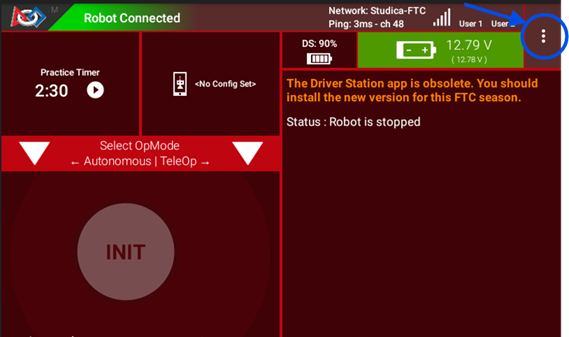
    3. Tap the three dots (⋮) in the top-right corner.

    Accessing the Configuration Menu of the Control Hub Steps 2 and 3

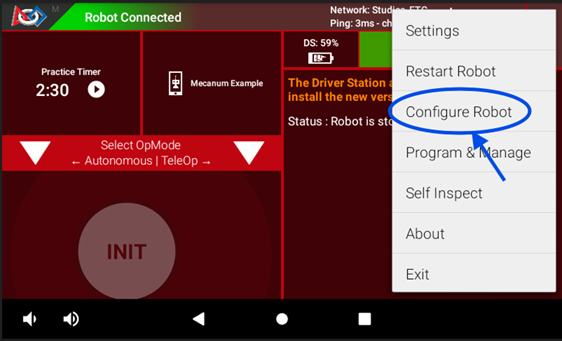
    4. Select Configure Robot.

    Accessing the Configuration Menu of the Control Hub Step 4

    Create a New Configuration

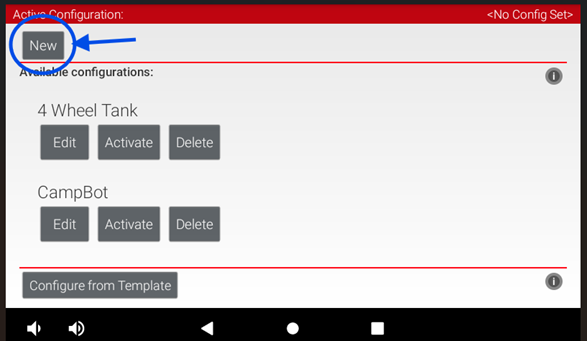
    1. Tap “New”

    Create a New Configuration Step 1

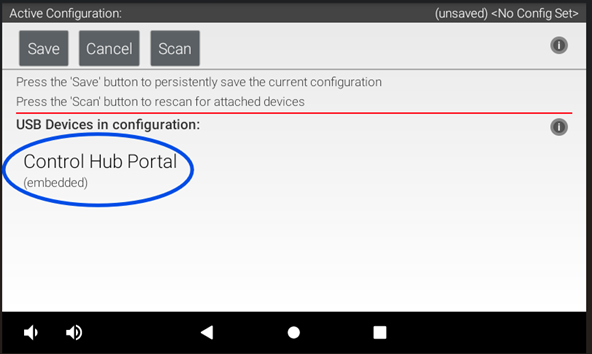
    2. Select your hardware type (Control Hub) and click on the “Control Hub Portal”

    Create a New Configuration Step 2

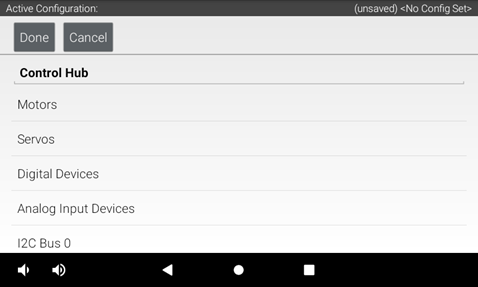
    3. You will see a list of available ports.

    Create a New Configuration Step 3

    How to Assign Motors to Ports

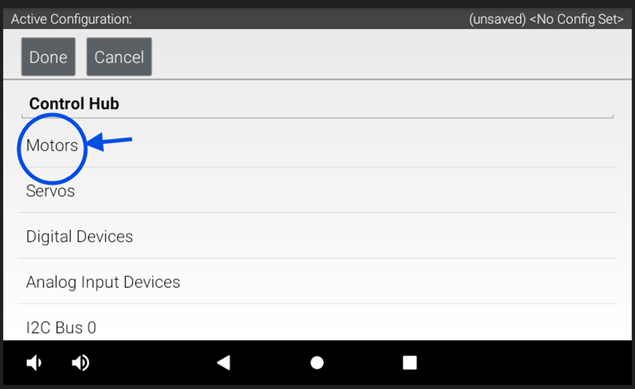
    1. Tap on a Motor Port (example: Port 0)

    Assigning Motors to Ports Step 1

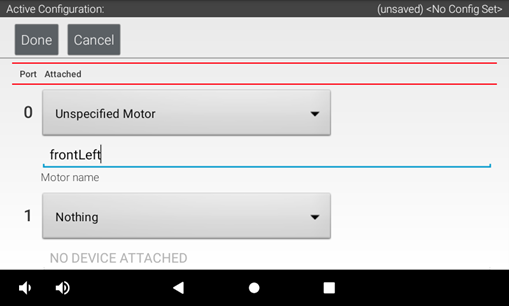
    2. Assign each motor port to the correct motor and name each motor

    Assigning Motors to Ports Step 2

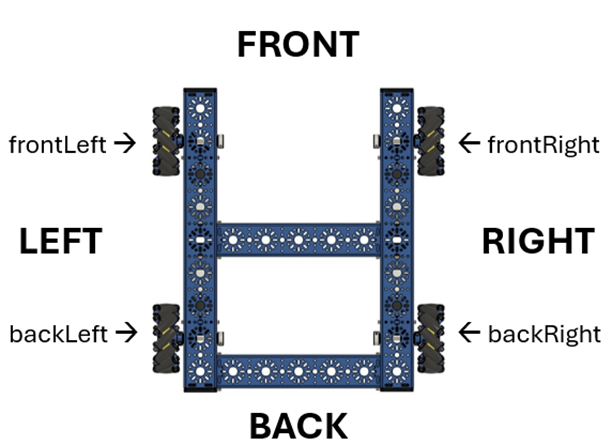
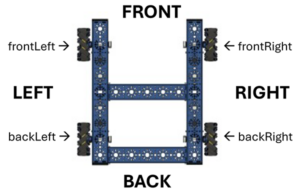
    3. Name the motors based on the drivetrain’s perspective (front, back, left, right). For this configuration, our motors are labeled as: Drivebase Orientation for Programming Movement

    Motor Name Port
    frontLeft 0
    frontRight 1
    backLeft 2
    backRight 3

      Tip: Use consistent directional names like frontLeft, frontRight, backLeft, and backRight. This prevents confusion later in programming.

    TeleOp Programming (Driver Control)

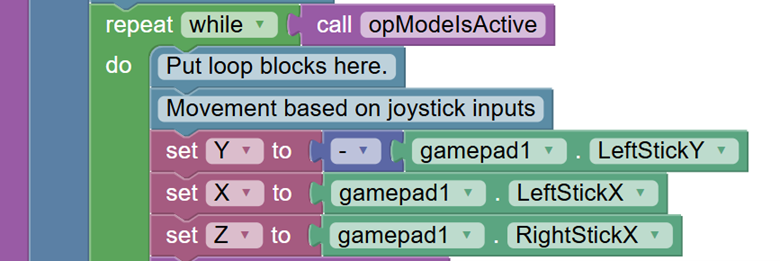
    The example TeleOp program shown below uses a simple block-based structure, making it easy to map driver inputs directly to robot movement controls. The information in this section introduces the key concepts you’ll need to understand before working through the drag-and-drop version of the program.

    Control Mapping and Motion

    Use the following control mapping as a reference for robot movement. The left joystick controls forward/backward and strafing, while the right joystick controls rotation.

    Motion Controller Input Axis
    Forward / Backward Left stick up / down Y-axis
    Strafe Left stick left / right X-axis
    Rotation Right stick left / right Z-axis

    Motor Behavior Setup

    Before writing any movement logic, the drivetrain motors need to be configured so they respond correctly during operation.

    Motor Direction

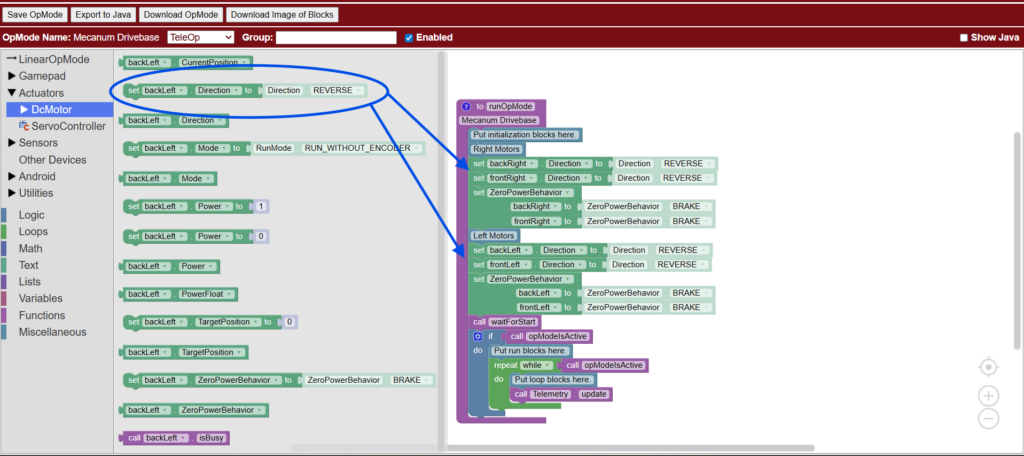
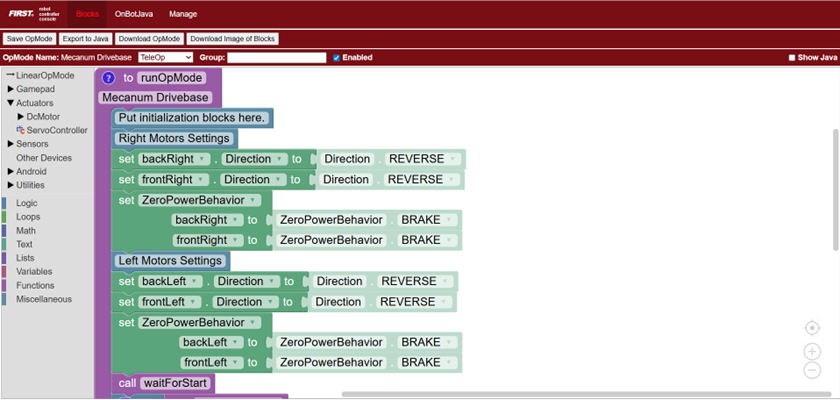
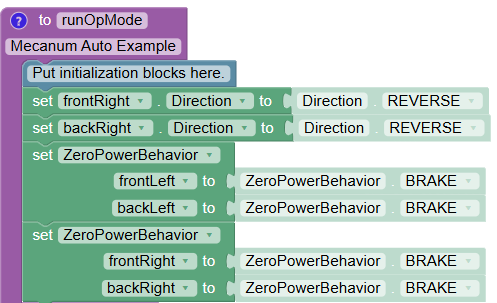
    Because the motors on opposite sides of a mecanum drivetrain face opposite directions, one side must be reversed. This ensures that when the robot is commanded to drive forward, all four wheels spin together in the correct direction. Here is the code showing motor direction configuration, where one side of the drivetrain motors is reversed so all wheels rotate correctly for forward movement. This code determines how motors will behave when not powered.

    Motor Direction Code Declaring Motor Behavior

    Zero Power Behavior

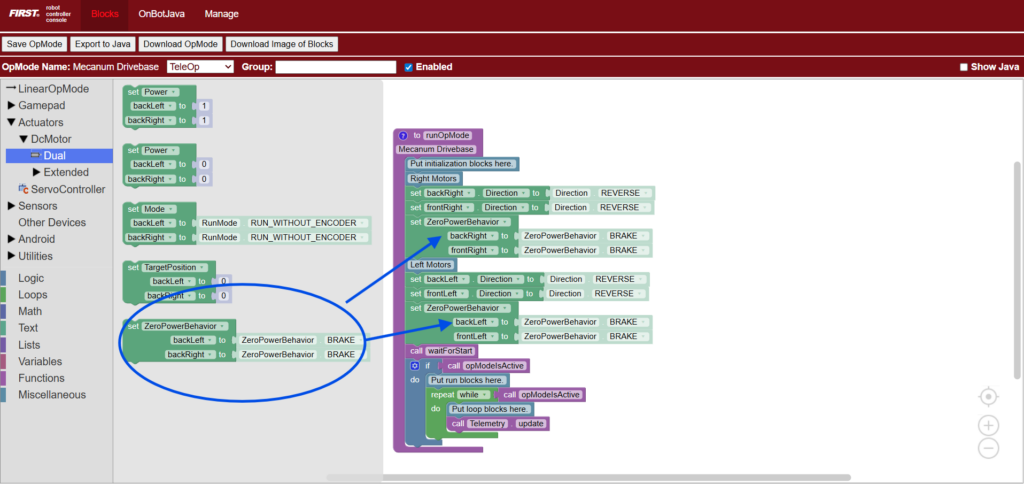
    Zero Power Behavior determines how the robot responds when no power is being applied. Setting this to BRAKE causes the motors to stop immediately and hold their position when the driver releases the joysticks. The drivetrain will stop immediately and try to hold its position. This provides more precise control during TeleOp. Here is the code setting drivetrain motors to BRAKE mode, causing the robot to stop immediately and resist rolling when joystick input returns to zero.

    Zero Power Behavior Code Example

    Declaring Motor Behavior - . Determining how the motors behave when not powered.

    Declaring Variables

    Next, create the variables that will control robot movement. These variables represent the three primary directions of the mecanum drive, along with a scaling value used to normalize motor power.

    • Y → Forward and backward movement
    • X → Side-to-side strafing movement
    • Z → Rotation left and right
    • Denominator → Scales motor powers proportionally so no value exceeds the allowed range, ensuring smooth and accurate movement

    Here, the code is creating variables for mecanum drive control, including forward/backward, strafing, rotation, and motor power normalization.

    Declaring Variables

    When multiple joystick inputs are combined, motor power values can exceed the allowed range of -1.0 to 1.0. Normalization scales all motor values proportionally so the strongest motor runs at full power while preserving the intended direction of movement. Without normalization, motor values are clipped, which causes uneven power distribution and unpredictable motion.

    Why Normalizing Motor Power Matters

    When multiple joystick inputs are combined, motor power values can exceed the allowed range of -1.0 to 1.0. Normalization scales all motor values proportionally so the strongest motor runs at full power while preserving the intended direction of movement. Without normalization, motor values are clipped, which causes uneven power distribution and unpredictable motion.

    Setting the Denominator Variable

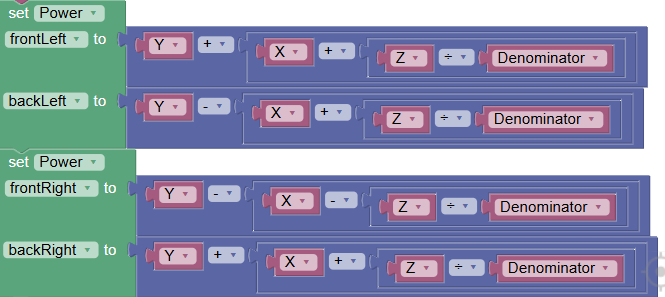
    Mecanum Motor Power Equations

    Each wheel receives a combination of X, Y, and Z values. These equations determine how forces combine to produce omnidirectional movement.Mecanum Power Diagram

    • frontLeft = Y + X + Z
    • backLeft = Y − X + Z
    • frontRight = Y − X − Z
    • backRight = Y + X − Z

    Each value is then divided by a normalization factor when necessary.

    Why This Works

    • Y controls forward and backward movement.
    • X controls sideways strafing.
    • Z controls rotational torque.

    Because each wheel contributes differently, combining these inputs creates full omnidirectional motion.

    Setting Motor Power  

    Autonomous Programming

    Before diving into the full autonomous example, it’s important first to understand the foundation of Autonomous Programming in FTC. This section begins with Initialization and Calling Functions, which set up how the robot’s motors and systems will behave before any movement starts. Defining motor behavior early ensures your autonomous runs accurately and consistently, while clearly structuring functions helps you understand what each part of your code is responsible for before putting everything together into a complete autonomous sequence.

    Initialization

    As previously demonstrated in the TeleOp example, set the motor direction so that the all the wheels move in the same direction to drive forward. Then set the motors so that all the wheels brake when motor power = 0

    Initialization Setting Motor Behavior

    Calling Functions

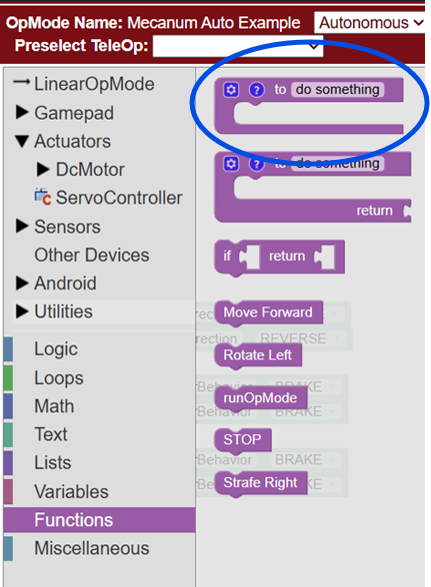
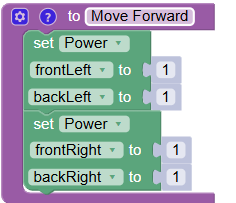
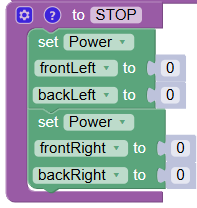
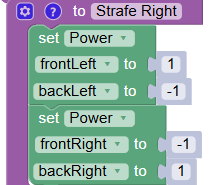
    For this autonomous example, each movement of the robot is separated into its own function. A function is a reusable block of code to perform a specific task. So instead of repeatedly writing the same motor commands, you can group them into a single function and call those commands whenever needed. Create the following functions below. These functions define the motor outputs to perform each movement. The “STOP” function sets all motor power to zero, ensuring the robot halts before executing the next action

    Calling Functions Where to access function blocks

    Basic Autonomous Example

    Autonomous code runs sequentially from top to bottom. Each block is executed in order, one after another. A simple FTC autonomous routine often begins with timed movements. Here is an example flow:

    • Move forward (1.5 seconds) - Here is a code example: Move Forward
    • Stop (1 second) - Here is a code example: Stop Code
    • Strafe right (0.5 seconds) - Here is a code example: Strafe Right Example
    • Stop (1 second)
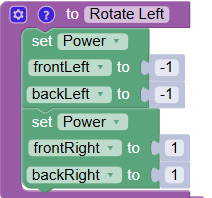
    • Rotate left (1.5 seconds) - Here is a code example: Rotate Left Function
    • Stop

    Improving Control and Tuning

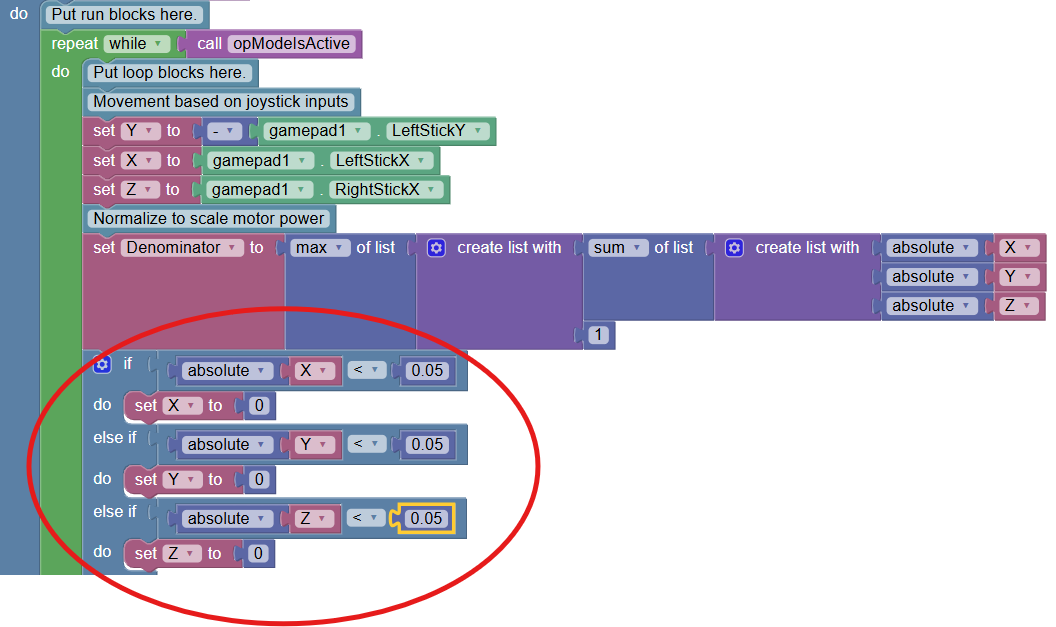
    1. Deadzone (Fix Stick Drift)

    Deadzones prevent unintended motion when the joystick is near zero.

    • Helps eliminate drift
    • Improves stability at rest

    Tradeoff: Too large of a deadzone can reduce fine control. Deadzone Code Block

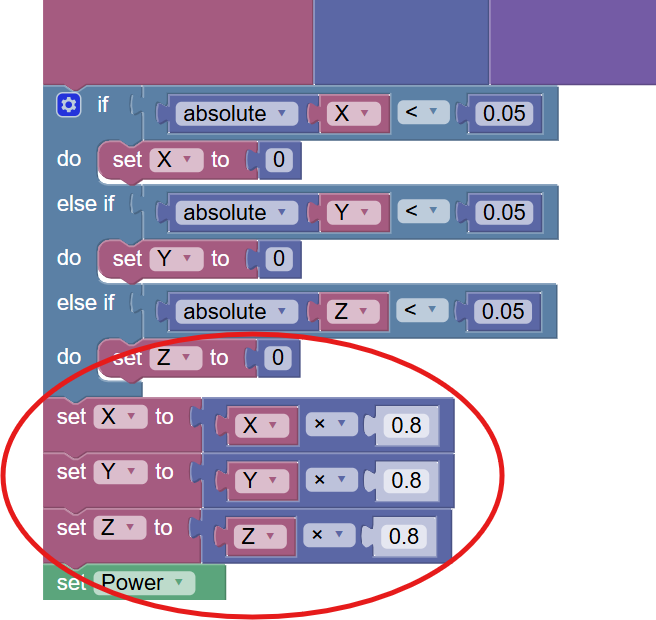
    2. Input Scaling

    Input scaling reduces maximum speed for better precision.

    • Example: 1.0 × 0.8 = 0.8
    • Makes the robot easier to control

    Tradeoff: Lower maximum speed. Scaling Motor Power Input Code Block

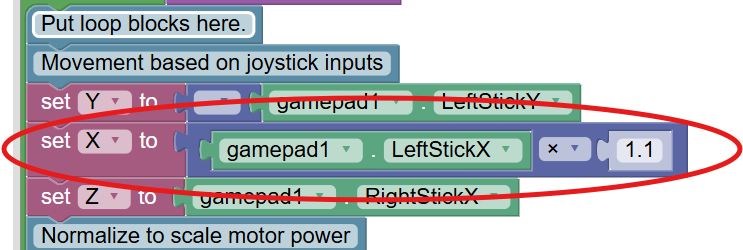
    3. Strafe Compensation

    Mecanum wheels are typically less efficient when moving sideways than forward. Slightly increasing the X input can improve balance between strafe and forward speed. Strafe Compensation Code

    Troubleshooting Common Programming Issues

    Here are some common issues FTC teams face when programming their mecanum chassis, along with helpful tips to fix them.

    Issue What to Check / Fix
    Robot moves incorrectly Verify the motor direction settings in the code and ensure the motors are mapped correctly.
    Robot drifts Confirm proper normalization is implemented and check wheel alignment.
    Strafing doesn’t work Ensure mecanum wheels are installed in the correct “X” pattern and motor mapping matches your code.
    Motors behave inconsistently Use telemetry to monitor joystick inputs and motor outputs in real time.

    Telemetry (Your Best Debugging Tool)

    Telemetry helps teams debug by showing live data from the robot while the code is running. Instead of guessing what the robot is doing internally, telemetry lets you see exactly what the robot thinks is happening in real time.

    In FTC programming, you typically use telemetry during testing to compare what you expect the robot to do with what it is actually doing. If something looks wrong, telemetry helps you narrow down whether the issue is coming from the controller inputs, your code logic, or the motors themselves.

    Telemetry Debugging Overview

    Here are some of the most common things teams use telemetry to check:

    Debug Area What It Shows How It Helps
    Joystick inputs (X, Y, Z) Gamepad values (-1 to 1) for each stick axis Confirms controller inputs are being read correctly and helps identify mapping or control issues
    Motor output values Real-time power sent to each motor Verifies drivetrain math, motor direction, and whether power is being applied correctly
    Real-time robot behavior Key variables like drive mode, speeds, or sensor data Helps you understand what the robot is doing while running and isolate logic vs hardware issues

    This is one of the most valuable debugging tools in FTC programming because it turns invisible code behavior into clear, readable information you can act on immediately.

    Where Studica Robotics Fits In

    FTC Drive Base Kit from Studica Robotics The Studica Robotics FTC Drive Base Kit is designed to make mecanum programming easier by providing:

    • Pre-engineered drivetrain geometry
    • FTC-compatible motor configuration
    • Consistent mechanical alignment for smoother strafing
    • A reliable starting point for learning drivetrain programming

    This allows teams to focus less on mechanical inconsistencies and more on learning core robotics concepts like kinematics, control systems, and autonomous design.

    Frequently Asked Questions

    What is mecanum drive in FTC? Mecanum drive is a holonomic drivetrain that allows a robot to move in any direction without turning first. Why do FTC teams use mecanum wheels? They provide full directional movement, making scoring, alignment, and positioning faster and more efficient. Why is my mecanum robot drifting? Common causes include incorrect motor direction, missing normalization, joystick drift, or mechanical misalignment. Do I need to normalize motor power? Yes. Without normalization, combined inputs can exceed motor limits and cause unpredictable movement. What is the best way to learn FTC mecanum programming? Start with TeleOp control, then add tuning features like deadzones and scaling. Once you're comfortable, move on to encoder-based autonomous routines.

    Conclusion

    Programming an FTC mecanum drivetrain is one of the most important skills for competitive robotics teams. Once teams understand how forces combine across all four wheels, they can unlock smooth omnidirectional movement, precise driver control, and reliable autonomous performance. With the Studica Robotics FTC Drive Base Kit, teams gain a strong mechanical foundation, allowing them to focus on what really matters: writing smarter code, improving control, and building better autonomous strategies.

    0 The Countdown Is On for the FIRST® Championship 2026

    Quick Summary: The countdown is on for the FIRST® Championship 2026. Teams from around the world are heading to Houston for this global robotics event featuring FTC DECODE™ and FRC REBUILT™, bringing together thousands of students, mentors, and innovators. This is where the FIRST® AGE™ season comes to life.

    Welcome to FIRST® Championship 2026

     The energy is building, the robots are ready, and teams are preparing for one of the most exciting events in STEM. The FIRST® Championship 2026, presented by BAE Systems, takes place from April 29 to May 2 in Houston, Texas.

    This event becomes a global hub of innovation, bringing together more than 50,000 attendees, 19,000 students, and over 1,000 teams from 66 countries. For many, this is the moment everything has been building toward: a chance to compete, connect, and celebrate a season of hard work and discovery.

    Why the FIRST® Championship Matters

    The FIRST® Championship is more than a competition; it’s a global celebration of creativity, collaboration, and the future of STEM. Students, FIRST® Championship 2026mentors, and educators come together not just to compete, but to share ideas, learn from one another, and be part of something bigger. It’s where you see months of iteration come to life on the field, where innovative designs are pushed to their limits, and where teams discover what they’re truly capable of.

    From intense matches to inspiring conversations in the pits, every moment is an opportunity to grow. It’s this combination of competition, community, and purpose that makes the FIRST® Championship unlike anything else.

    Inside the DECODE™ and REBUILT™ Challenges

    This season, innovation takes center stage as teams explore the FIRST® AGE™ archaeology-inspired robotics season and push their designs further than ever.

    DECODE™ challenges FIRST® Tech Challenge (FTC) teams to investigate the power of artifacts in an archaeology-inspired game. With a focus on scoring, strategy, and teamwork, teams must shoot, manage, and adapt in a fast-paced, dynamic field. REBUILT™, on the FIRST® Robotics Competition (FRC) side, invites teams to reimagine the past while engineering for the future. With large-scale robots and high-energy matches, precision, performance, and collaboration are key.

    On-Site Support for Teams

    Studica Robotics will be on-site in the FTC and FRC Robot Service Centers, working directly with teams throughout the event, helping troubleshoot, optimize, and keep robots competition-ready.

    Built for STEM. Designed for Competition.

    FTC Starter Bot Shooter Iteration made with Studica RoboticsFor more than 40 years, Studica has supported education and industry with technology designed to help learners build real-world skills through hands-on experience. Through its robotics division, Studica Robotics continues that mission by developing a modular building platform designed for STEM education and competitive robotics teams.

    Engineered for compatibility, strength, and ease of use, Studica Robotics components are designed to integrate with common FRC and FTC ecosystems without requiring specialized tools or complex setup. The platform includes a wide range of robot parts, from structure and motion components to controllers, sensors, IMUs, motors, and navigation tools, supporting teams from early prototypes to competition-ready robots.

    Key Solutions for FTC and FRC Teams

    This season, several Studica Robotics solutions stand out as teams prepare for competition.

    For FTC Teams

    FTC Starter Kit 2025-2026 Season (DECODE™)The Studica Robotics FTC Starter Kit for the 2025–2026 DECODE™ season is designed to help teams move quickly from concept to competition-ready robot. Available in six structure colors, the kit supports flexible design, rapid prototyping, and hands-on learning throughout the build season. New for this year, the kit includes 6mm HEX components and shafts, and updated Maverick HEX shaft motors with multiple planetary gearbox options, giving teams more control over drivetrain performance, torque, and mechanism design. Studica-Robotics-FTC-Starter-Bot-Kit-2025-2026-DECODEThe FTC Starter Bot, built using the Starter Kit, provides a functional baseline robot for DECODE™ gameplay. It helps teams spend less time on initial fabrication and more time on iteration, strategy, and refinement. Designed to demonstrate core tasks such as receiving and holding game pieces, moving them across the field, indexing into a mechanism, shooting toward the goal, actuating field elements, and running a basic autonomous routine, it gives teams a clear starting point for development. While fully functional, the design is intentionally a starting point, giving teams room to modify and improve based on their own strategy and ideas. 

    navX3-CAN Robotics Navigation SensorFor FRC Teams

    For FRC teams, consistency and control are critical. The NavX3-CAN IMU provides high-speed, accurate motion data to support reliable navigation, stable drivetrain control, and improved autonomous performance. With upgraded sensing architecture and fast CAN-FD communication for reliable, high-speed data transfer, this next-generation inertial measurement unit (IMU) helps teams maintain orientation and improve repeatability in both autonomous and teleoperated modes. navX3-CAN Robotics Navigation SensorWhen combined with a range of FRC-ready components, Studica Robotics supports teams building systems that prioritize accuracy, durability, and performance under pressure. From structural components to advanced sensors, Studica Robotics helps teams build with confidence and compete at their best.

    More Than a Competition

    FIRST® is about more than robots. It’s a global community built on mentorship, innovation, and opportunity.

    Through hands-on learning and team-based problem-solving, students gain the skills, confidence, and resilience to succeed, whether they pursue careers in STEM or take these experiences into entirely new paths. Programs like FIRST® Tech Challenge and FIRST® Robotics Competition continue to inspire the next generation of engineers, leaders, and innovators, proving year after year that the impact goes far beyond the field.

    Frequently Asked Questions

    What is the FIRST® Championship 2026?
    The FIRST® Championship is the global finale of the FIRST® season, bringing together thousands of students from around the world to compete at the highest level across four programs: FIRST® Robotics Competition (FRC), FIRST® Tech Challenge (FTC), FIRST® LEGO® League Challenge, and FIRST® LEGO® League Explore.

    When and where is the FIRST® Championship 2026 happening?
    April 29 to May 2, 2026, at the George R. Brown Convention Center in Houston, Texas.

    What are FTC DECODE™ and FRC REBUILT™?
    They are the 2025–2026 FIRST® game challenges. DECODE focuses on artifact-based gameplay and strategy, while REBUILT features large-scale robot competition and alliance strategy.

    Will Studica Robotics be there?
    Yes, Studica Robotics will be supporting teams in the FTC and FRC Robot Service Centers.

    Is the FIRST® Championship and "FIRST® Worlds" the same thing? Yes. “FIRST® Worlds” is a term commonly used by teams to refer to the FIRST® Championship, the official global event that concludes the season.

    See You in Houston!

    The excitement is building, and the FIRST® Championship 2026 is set to be an unforgettable celebration of innovation, teamwork, and discovery. Whether you’re competing, mentoring, or cheering from the sidelines, this is the moment everything comes together. If you’re heading to Houston, be sure to connect with the Studica Robotics team in the FTC and FRC Robot Service Centers. We’re there to help teams stay ready, solve problems, and keep competing at their best.

    Good luck, teams!

    0 WorldSkills Shanghai 2026: Building Skills for a Changing World
    Explore how WorldSkills Shanghai 2026 empowers youth through Autonomous Mobile Robotics and Unmanned Aerial Systems competitions.
    0 Choosing the Right Drivetrain for Your Robot

    Quick Summary: Your robot’s drivetrain determines how it moves on the field, how easy it is to control, and how well it performs during matches. For FTC teams and other robotics programs, the most common options are tank drive, mecanum drive, and other holonomic systems like X-Drive or Kiwi (A-Frame). This article breaks down the advantages, disadvantages, programming complexity, and strategic uses of each drivetrain type so teams can make informed design choices.

    Understanding Drivetrains

    Your robot’s drivetrain is the foundation of how it moves and interacts with the game field. Choosing the right drivetrain affects not only performance but also how easy it is to build, program, and drive during a match.

    Robot Drivetrains ImpactA well-designed drivetrain impacts:

    • Speed: How quickly your robot moves across the field.

    • Maneuverability: How easily it changes direction.

    • Traction: Grip on the game surface.

    • Mechanical complexity: Difficulty to build and maintain.

    • Driver control: Ease of operation during matches.

    Tank Drive

    Tank drive is one of the most common drivetrains for FTC robots, especially for beginner teams. Its straightforward design and simple control make it ideal for teams focusing on pushing power, defense, and reliability. While it doesn’t allow sideways movement (strafe), it’s durable, easy to build, and simple to program, making it beginner-friendly.

      Details
    Description Wheels on the left and right sides move independently. Forward/backward is simple; turning requires spinning one side faster.
    Advantages High traction and pushing power; simple to build and maintain; beginner-friendly; durable and reliable.
    Disadvantages Cannot strafe sideways; slower alignment with targets; less efficient for fast, precision scoring.
    Best Use Cases Pushing/defense-focused strategies; beginner teams; games prioritizing stability over speed or complex maneuvers.
    Programming Complexity Low. Direct joystick-to-motor mapping; no vector math required.

    Before diving into wheel configurations, teams should consider how the number of powered wheels will affect traction, stability, and turning. Choosing the right setup can improve performance on the field without adding unnecessary complexity.

    Common Tank Drive Configurations: Examples:  
    2WD Tank Drive Prototype/learning platform, less traction 2WD Tank Drive Train Tank 2 Wheel Drive Example
    4WD Tank Drive Balanced, most common in FTC 4WD Tank Drive Train Tank 4 Wheel Drive Example 2026
    6WD Tank Drive Better traction and weight distribution, slightly more complex 6WD Tank Drive Train Tank 6 Wheel Drive Example

    FTC Starter Kit 2025-2026 Season (DECODE™)The FTC Starter Kit 2025–2026 from Studica Robotics gives teams everything they need to build a reliable tank drive robot. Made with precision 6061-T6 aluminum structure parts, it is durable, safe, and easy to assemble, making it ideal for beginner and intermediate teams focused on pushing power, reliability, and straightforward programming. The kit includes updated Maverick Motors with Hex Shafts, optional planetary gearboxes, and 6mm Hex components, and comes in six vibrant structure colors.

    Mecanum Drivetrain

    Mecanum drivetrains use four specialized wheels with angled rollers, allowing your robot to move in any direction without rotating first. This makes them highly maneuverable and ideal for scoring-focused or precision-based games. While they offer excellent alignment and cycle efficiency, they require more careful setup and programming than a tank drive.

      Details
    Description Uses four mecanum wheels with angled rollers for omnidirectional movement. Can move forward, backward, sideways, diagonally, and rotate in place.
    Advantages High maneuverability; can strafe without rotating; fast alignment with scoring targets; excellent for cycle-based scoring games.
    Disadvantages Lower traction and pushing power than tank drives; sensitive to weight distribution; moderate-to-high programming complexity (vector math required).
    Best Use Cases Scoring-focused or precision-based games; intermediate to advanced teams.
    Programming Complexity Moderate to high; requires vector math for combining forward, strafe, and rotation inputs; motor mixing needed for smooth movement.

    Mecanum Drivebase Examples

    Mecanum Drive Example

    Mecanum Drivetrain

    FTC Drive Base Robotics Kit - v2 ComponentsThe FTC Drive Base Kit from Studica Robotics is a competition-ready Mecanum drivetrain designed specifically for FTC teams.

    ✅ Built with reliable, precision components, the FTC Drive Base Kit supports advanced autonomous paths and demanding maneuvers.

    ✅ The kit is available in a variety of structure colors including blue, red, black, green, silver, and gold, with D-shaft or Hex-shaft components.

    Other Holonomic Options

    Beyond Mecanum, there are other holonomic drivetrains that allow omnidirectional movement, meaning the robot can move in any direction without needing to rotate. X-Drive and Kiwi (A-Frame) designs are less common in FTC but offer unique advantages in maneuverability and compact design. They require more careful setup and programming than tank drives or Mecanum systems, so they’re generally used by intermediate or advanced teams.

    X-Drive

    X-Drive is a holonomic drivetrain with four omni-wheels mounted at 45° angles. Like Mecanum, it allows true omnidirectional movement, but with straight rollers instead of angled rollers. This makes motion smooth and predictable, though traction is lower than a tank drive.


    Details

    Description Four omni-wheels at 45° angles; moves in any direction without rotating first.
    Advantages True omnidirectional movement; smooth transitions; predictable motion.
    Disadvantages Lower traction; tricky to fit mechanically; may interfere with frame design.
    Best Use Cases Advanced maneuvering; games needing precise omnidirectional control.
    Programming Complexity Moderate to high; requires vector math and careful motor calibration.

    X-Drive Examples

    X Drive Drivebase Example X-Drive CAD Example

    Kiwi (A-Frame) Drive

    The Kiwi (or A-Frame) uses three omni-wheels arranged in a triangle. Each wheel contributes to all directions of movement, giving omnidirectional motion in a minimal footprint. This setup is lightweight and uses fewer motors, but stability can be an issue.

      Details
    Description Three omni-wheels in a triangular configuration; omnidirectional movement with minimal components.
    Advantages Fewer components; lightweight; efficient motor usage; true omnidirectional motion.
    Disadvantages Less stable; sensitive to weight distribution; more complex programming; requires vector math.
    Best Use Cases Compact or motor-limited robots; teams wanting true omnidirectional control in a small footprint.
    Programming Complexity Moderate to high; requires vector math; less intuitive than tank or mecanum drives.

    Kiwi (A-Frame) Examples

    Kiwi A Frame Drive Base Example Kiwi Drive CAD Example

    Decision-Making Guidance

    When choosing a drivetrain, teams need to balance gameplay priorities, robot complexity, and driver skill. No single drivetrain is best in every situation; what works for a pushing-heavy strategy might not be ideal for fast, precision scoring. This table provides a side-by-side comparison of tank and holonomic drivetrains across key performance priorities:
    Priority Tank Drive Holonomic (Mecanum/X/Kiwi)
    Pushing / Defense High traction, strong grip Lower traction, easier to be pushed
    Scoring / Precision Slower repositioning Faster alignment, smooth cycles
    Speed vs. Control Stable at higher speeds, simple Flexible movement, higher control ceiling
    Simplicity vs. Performance Easier to build and program More complex, higher performance potential
    Tips for FTC teams:
    ✅ If your robot will spend most of the match scoring and cycling, a holonomic drivetrain (mecanum/X/Kiwi) can save time and improve accuracy. If your focus is defense or straightforward, reliable play, a tank drive keeps things simple and robust.
    ✅ Consider your team’s experience level, game strategy, and mechanical skill when selecting a drivetrain.
    ✅ Use simpler tank drives for early competitions or defensive strategies.
    ✅ Invest in mecanum or X-Drive if your game emphasizes precision scoring or requires frequent lateral movement.

    Frequently Asked Questions

    Which drivetrain is easiest for beginners?
     The tank drive is the simplest to build, program, and operate.

    Can Mecanum drives push as well as tank drives?
    No, they have less traction and lower pushing power, so they are better for scoring and maneuvering.

    Are X-Drive or Kiwi drives common in FTC?
    They are less common and are usually chosen for compact robots or specialized strategies.

    How do I decide between 2WD, 4WD, or 6WD tank configurations?
    2WD for prototypes/learning, 4WD for balanced performance (most FTC teams), 6WD for heavy or defensive robots.

    What is a holonomic drivetrain? A holonomic drivetrain lets a robot move in any direction without rotating first. Examples include mecanum, X-Drive, and Kiwi drivetrains. Are there robotics kits available to create a mecanum drivetrain? Yes, FTC teams can use the FTC Drive Base Kit from Studica Robotics to build a mecanum drivetrain.

    Conclusion

    Choosing the right drivetrain is critical for aligning your robot’s design with your team’s strategy, skill level, and competition goals. Tank drives excel in defense and simplicity, while mecanum and other holonomic drives offer superior maneuverability and precision scoring potential.

    For FTC teams, solutions like the FTC Starter Kit 2025–2026 and the FTC Drive Base Kit from Studica Robotics provide practical, high-quality options for building reliable tank or mecanum drivetrains, helping teams get up and running with proven components.


    0 How Teams Prototype Reliable FTC Intake and Shooter Systems
    FTC intake overview for teams: learn wheel, motor, and component choices to prototype reliable intakes and shooters with consistent scoring.
    0 NavX3-CAN: The Next-Generation IMU for FRC and Robotics

    Quick Summary: The NavX3-CAN robotics navigation sensor is a completely re-engineered inertial measurement unit (IMU) for FRC and competition robotics. Designed from the ground up, it features a new gyro, accelerometer, magnetometer, and CAN-FD connectivity, providing accurate sensor data, easy calibration, and improved autonomous control. Ideal for all teams, from rookies to advanced builders.

    What is an IMU and How is it Used in Robotics?

    navX3-CAN Robotics Navigation SensorAn IMU (Inertial Measurement Unit) is a sensor that tells a robot how it is moving and which way it is oriented. It combines a gyroscope, accelerometer, and magnetometer.

    A gyroscope measures how fast and in which direction the robot rotates. An accelerometer measures acceleration, how quickly the robot speeds up or slows down in any direction. A magnetometer acts like a compass to detect orientation.

    In robotics, including FRC and other competitions, IMUs help robots drive straight, turn accurately, and navigate the field. They provide real-time data for autonomous routines and precise control, helping teams improve reliability and overall performance.

    NavX3-CAN: Upgrades for FRC Teams

    NavX3-CAN is a completely redesigned competition IMU. Unlike the previous NavX2 IMU, nothing carries over from the earlier version. All hardware, firmware, and architecture are completely new from the ground up.
    Major Advantages:
    ✅  navX3-CAN Robotics Navigation SensorBrand-new IMU, magnetometer, MCU, and CAN architecture: Offers a fresh start for modern competitions.
    ✅  CAN-FD connectivity: Up to eight times faster than CAN 2.0, with up to eight times more data per packet for smoother control and better logging.
    ✅  Easy Calibration:
    Mount in any position or direction, simple user app to increase accuracy.
    ✅  High-speed Output: User-selectable rates up to 1000 Hz for fast control loops.
    ✅  Durable Design: Sealed case, reverse power protection, and color-coded Wago connectors. These upgrades ensure that every team, from rookies to advanced builders, can rely on accurate sensor data without complicated setup or difficult calibrations.

    How NavX3-CAN Helps Teams Succeed

    ✅  Accuracy: Continuous per-axis bias estimation and a custom sensor fusion algorithm reduce drift and improve autonomous performance.
    ✅  Simple Calibration: Orientation-independent setup saves time during build season and competitions.
    ✅  Team-Friendly:
    Works for rookies with simple setup and reliable data, while advanced teams can push for higher autonomous precision.
    ✅  Future-Ready Systems:
    Compatible with legacy roboRIO via CAN 2.0 and ready for SystemCore updates in 2027.

    NavX3-CAN Technical Highlights


    Feature Specification
    Gyroscope ±15.625 dps to ±4000 dps, 16-bit resolution
    Accelerometer ±2 g to ±32 g, 16-bit resolution
    Magnetometer ±800 µT, 13 nT resolution
    Outputs Yaw, Pitch, Roll, 6- & 9-axis Quaternion, Linear Acceleration, Angular Velocity
    Voltage Range 5–30 VDC
    Shock Reliability 20,000 g
    Operating Temperature -20°C to +85°C
    Low Drift  No motion: ~0.0619°/hour 5 seconds after motion: ~0.0582°/min

    CAN-FD: Faster Data for Better Robot Control

    CAN-FD (Controller Area Network Flexible Data-Rate) is an upgraded communication protocol that sends more data at higher speeds than the traditional CAN 2.0 (Controller Area Network Version 2.0, the older standard used for connecting sensors and controllers in robotics and automotive systems). For FRC teams, this means your robot can get sensor readings faster and more reliably, improving responsiveness and ultimately smoother autonomous operation.

    ✅  Smoother Sensor Readings: Faster updates mean more precise and responsive control.

    ✅  Better Autonomous Performance: High-speed data improves autonomous routine accuracy.

    ✅  Seamless FRC Integration: Works with modern control systems and prepares teams for future updates.

    Frequently Asked Questions

    Who should use the NavX3-CAN?
    All FRC robotics teams can benefit from the NavX3-CAN. Rookie teams enjoy a straightforward setup and automatic calibration, while advanced teams gain precise control for complex autonomous routines.

    How is it different from the NavX2?
    The NavX3-CAN is a complete redesign. All hardware, firmware, and architecture are new, providing a modern competition-ready IMU and competition robotics sensor for FRC.

    Do I need to worry about calibration?
    Before NavX-sensors are shipped, the accelerometers and gyroscopes are initially calibrated at the factory; this calibration data is stored in flash memory and applied automatically to the accelerometer and gyroscope data each time the NavX-sensor circuit board is powered on. A simple PC app allows the user to re-calibrate to help increase accuracy. While calibrating, the sensor will automatically detect its orientation.

    Can I use it with older roboRIO systems?
    Yes. The sensor supports CAN 2.0 for legacy systems and also offers CAN-FD for high-speed data and improved control performance.

    Will it improve autonomous performance?
    Yes. The NavX3-CAN delivers improved accuracy, low yaw drift, and reliable sensor data, making autonomous routines more precise and effective in FRC competitions.

    Build Smarter with FRC-Ready Accessories

    Studica Robotics offers FRC-ready components to support your build:

    Flexible Silicone Bonded WireWire Options

    Pre-Drilled Extrusion

    Each of these accessories is designed to help teams build faster, wire reliably, and focus on programming and autonomous performance.

    Build Smarter and Compete Stronger

    The NavX3-CAN makes your robot smarter, easier to program, and more reliable on the field. Whether you’re a rookie team taking your first steps or an advanced team chasing precision, it gives you the edge you need this FIRST® Robotics Competition REBUILT™ season.

    Studica Robotics also offers a range of FRC-ready components to support your build, including flexible bonded wire in multiple gauges, CAN and sensor-specific options, and pre-drilled extrusion at competitive prices. These tools help teams get up and running quickly so they can focus on programming and optimizing autonomous routines.

    Get ready for an exciting FRC season and take your robot’s performance to the next level with NavX3-CAN and the supporting components designed to help your team succeed.

    0 FTC Robot Build: Starter Kit and Drive Base Kit Upgrade Ideas

    Quick Summary: Building a reliable, high-performing robot for the 2025-2026 DECODE Season is one of the most rewarding parts of the FTC robot build process. Whether your team is using the Studica Robotics FTC Starter Kit or the FTC Drive Base Kit, both systems provide a strong mechanical foundation. However, the real power lies in following an iterative design approach, where you prototype, test, analyze, and refine your robot over time.

    This article guides teams through practical, beginner-friendly methods to upgrade both kits while enhancing their engineering skills.

    Why Iteration Matters for Your FTC Robot Build

    One of the most valuable lessons in FTC is understanding that robots are not built once; they’re built over time. Every test, every failure, every small adjustment moves your team closer to a stable, high-scoring machine. Both Studica Robotics kits are designed to support that iterative design process:

    FTC Starter Kit Helps teams quickly assemble an FTC Starter Bot so they can test early, begin programming, and learn drivetrain behavior. FTC Drive Base Kit Offers a complete Mecanum drivetrain that teams can refine and expand with their own scoring mechanisms.
    Studica Robotics FTC Starter Kit and FTC Starter Bot FTC Drive Base Kit from Studica Robotics - New Colors!
    View Kit Contents/BOM

     FTC Starter Kit 2025-2026 Season (DECODE™)

    View Parts List

    FTC Drive Base Robotics Kit - v2 Components

    Iterating early and often helps teams: ➡️ Improve driving performance ➡️ Test mechanisms in real-world conditions ➡️ Make informed upgrades instead of guessing ➡️ Build confidence with hardware and mechanical systems

    The Engineering Cycle Behind FTC Iteration

    Iterative design in FTC is not a random trial and error process. It is a structured engineering cycle that mirrors professional engineering practices. Every improvement your team makes follows the same core steps found in professional engineering:

    Define → Ask → Imagine → Plan → Prototype → Test → Iterate

    Engineering Design Process

    This cycle helps teams:

    ➡️ Identify what needs to change or improve

    ➡️ Explore constraints, rules, and existing solutions

    ➡️ Brainstorm multiple ways to solve the problem

    ➡️ Select an approach that fits strategy and resources ➡️ Build quick prototypes to try ideas early

    ➡️ Test designs on the field to gather real performance data

    ➡️ Refine based on what the tests reveal Using these steps gives teams a clear, repeatable method for refining mechanisms, improving scoring consistency, and strengthening overall robot reliability throughout the season. Review the full breakdown of the Engineering Design Process.

    How to Iterate Effectively During Your FTC Robot Build

    Regardless of which kit your team uses, these principles ensure smarter and safer iteration.

    ➡️ Make one change at a time to isolate what works and what does not

    ➡️ Test early and test often to see real performance in the field

    ➡️ Take pictures and document changes to save time during troubleshooting

    ➡️ Keep wiring organized to reduce disconnects and simplify servicing

    ➡️ Build with symmetry when possible to make balancing and reinforcement easier

    Iterating with the Studica Robotics Building System

    The Studica Robotics building system is designed for easy reconfiguration, ideal for rapid prototyping and refinement during an FTC robot build. The Studica Robotics Structure Advantage

    Key Advantages:

    Radial Hole Pattern: The unique hole pattern makes most structural pieces universally compatible, allowing parts to be easily repositioned or swapped.

    Versatile Structural Components: Available in multiple lengths and colors for refined prototyping:

    Easy to Swap and Adjust: Consistent hole spacing allows teams to:

        • Reinforce weak points
        • Add bracing
        • Change wheel types
        • Adjust motor layout
        • Mount sensors cleanly

    This flexibility is exactly what teams need when refining their robot design.

    Upgrading the Starter Kit for Your FTC Robot Build

    The FTC Starter Kit provides the baseline components for this season’s DECODE Starter Bot. It is designed to help teams:

    • Begin programming both autonomous and tele-op
    • Drive-test early
    • Understand drivetrain behavior
    • Work with OMS components
    • Add prototype mechanisms to the FTC Starter Bot to evaluate ideas early in the season.

    Once the Starter Bot is assembled and tested, teams can begin upgrading it.

    FTC Starter Kit Upgrade Ideas

    1. Add Low-Profile U-Channel Wheel Guards:
      Prevents field elements or other robots from catching on the drivetrain.
    2. Experiment with Different Flex Wheels:
      Different durometer (hardness) ratings affect how flex wheels compress and interact with game pieces, helping teams fine-tune intake behavior.
    3. Explore Motor Options:
      Studica Robotics offers Maverick HEX shaft motors with multiple planetary gearbox options available. Teams frequently choose between higher torque options and higher RPM options, depending on their drive strategy or mechanism needs.
    4. Reinforce the Chassis:
    5. Extra brackets or beams help maintain rigidity as mechanisms are added.
    6. Transition to a Mechanism-Ready Chassis: Many teams take the FTC Starter Bot’s scoring mechanism concepts and move them onto a more competition-ready Mecanum chassis.

      This helps teams learn:
      🔹 How to mount mechanisms cleanly
      🔹 How to maintain access to wiring
      🔹 How to improve scoring consistency

    FTC Starter Bot: Shooter on Mecanum Chassis

    This example takes the scoring system from the Studica Robotics FTC Starter Bot and places it onto a refined, competition ready Mecanum chassis. It’s a great starting point for teams looking to practice drivetrain control, get comfortable with strafing, and improve scoring efficiency.


    FTC Starter Bot: Wheel Guard Configuration

    This variation keeps the core Starter Bot design but adds wheel guards to boost durability and protect the drivetrain. The guards help prevent walls, other robots, and game elements from catching on the wheels or interfering with rotation.
    FTC Starter Bot Shooter with Mecanum Wheels FTC Starter Bot with Wheel Guard blog
    What it demonstrates: How teams can reuse a proven mechanism while upgrading mobility for smoother alignment, better field positioning, and more consistent scoring. What it demonstrates: A simple, low-effort upgrade that improves reliability without significant structural changes.

    Upgrading the FTC Drive Base Kit

    The FTC Drive Base Kit provides a complete mecanum drivetrain with omnidirectional movement, giving teams flexibility when designing mechanisms. Unlike the FTC Starter Kit, the FTC Drive Base Kit only provides the materials needed to create a drivetrain, giving teams total creative freedom to design their own scoring mechanisms.

    FTC Drive Base Kit Upgrade Ideas

    1.  Reinforced Mecanum Wheel Guards - Helps protect rollers during contact-heavy gameplay using:
      🔹 Standoffs
      🔹 T Brackets
      🔹 End Piece Plates
      🔹 Low-Profile U-Channels
    2. Vertical Motor Mounting - Some teams choose to mount motors vertically to create a clean underside with space for:
      🔹 Odometry
      🔹 Sensors
      🔹 Cable routing
    3. Leave Room for Sensors and Expansion - The area under the 288 mm U-Channels is ideal for:
      🔹 Odometry pods
      🔹 Distance sensors
      🔹 IMU stabilization mounts
      🔹 Future scoring mechanisms
    4. Improve Structural Rigidity - As teams add mechanisms, reinforcing the drivetrain with additional brackets or cross-members helps maintain frame strength.

    FTC Drive Base Kit: Protected Drivetrain with Odometry Support

    This version doesn’t include scoring mechanisms, but it features reinforced wheel guards designed to shield the Mecanum rollers and support the drivetrain during high-contact DECODE gameplay and space for odometry pods.

    FTC Drive Base Kit: Vertical Motor Mount for Under-Channel Odometry Space

    This design is a more competition-focused refinement of the FTC Drive Base Kit v2. The motors are mounted vertically, leaving a clean channel beneath the 288 mm U-Channels—perfect for odometry pods, sensors, or future add-ons. It also includes reinforced Mecanum wheel guards built using standoffs, T-brackets, end plates, and low-profile U-Channels to help protect the wheels from hard impacts.
    FTC Drivebase Kit with Wheel Guards and Odometry Kit Top View FTC Drivebase Kit vertical motor mount drivebase
    What it demonstrates: Wheel guards and integrated odometry pods for more accurate autonomous tracking and movement. What it demonstrates: A clean, expandable layout optimized for sensors and autonomous performance.

    Frequently Asked Questions

    What’s the main difference between the FTC Starter Kit and the FTC Drive Base Kit?

    The FTC Starter Kit includes everything needed for a baseline Starter Bot. The FTC Drive Base Kit is drivetrain-only, giving teams full freedom to design.

    Do I need special tools to upgrade the FTC Starter Bot?

    No. The unique Studica Robotics hole pattern allows parts, motors, gears, and other components to connect easily without special equipment.

    Can I use the FTC Starter Bot for prototyping?

    Yes. Many teams test early mechanisms or scoring ideas on the FTC Starter Bot.

    Can the FTC Drive Base Kit support advanced mechanisms?

    Absolutely. Its open layout is designed for sensors, scoring systems, and expansion structures.

    Should I choose torque or high-RPM motors?

    It depends on your design. Many teams prototype with different planetary gearbox ratios on their motor to determine their preferred performance.

    Why is iteration so important in FTC?

    Each change helps teams improve reliability, score faster, and understand how mechanical decisions affect robot behavior.

    Where can I learn more about the engineering design process?
    Learn more here: Dive into Robotics with the Engineering Design Process

    Closing Thoughts

    Both the FTC Starter Kit and FTC Drive Base Kit give teams a reliable starting point for their FTC robot build. Most teams improve performance by using the design-test-refine process reinforcing structure and refining layouts throughout the season. These adjustments help teams understand mechanical behavior while gradually developing a more consistent robot.

    EV SSL